Receiving Flight Signals using RTL-SDR (ADS-B Demo)
Featured Article Preview
OverviewThis document explains how to capture and decode live aircraft ADS-B signals using RTL-SDR and…
Click below to explore full content
OverviewThis document explains how to capture and decode live aircraft…
Continue reading for complete details.
Article summary
OverviewThis document explains how to capture and decode live aircraft ADS-B signals using RTL-SDR and dump1090. Prerequisites TableCategory Component / Tool DescriptionHardware RTL-SDR USB Dongle A software-defined radio receiver used to capture raw RF signals from aircraft (ADS-B at 1090…
What this article covers
Why it matters
Practical cybersecurity workflow understanding.
What to verify
Check commands, tools, and outputs step by step.
Next steps
Move into advanced labs and testing scenarios.
Source file
Receiving Flight Signals using RTL-SDR (ADS-B Demo)
Published on blog: March 2026
Editor note
Overview
This document explains how to capture and decode live aircraft ADS-B signals using RTL-SDR and dump1090.
Prerequisites Table
Category Component / Tool Description
Hardware RTL-SDR USB Dongle A software-defined radio receiver used to capture raw RF signals from aircraft (ADS-B at 1090 MHz).
Hardware Antenna (1090 MHz) Specialized antenna tuned for ADS-B frequency to improve signal reception and range.
Software Kali Linux (or any Linux OS) Operating system used to run SDR tools and perform signal decoding.
Software dump1090 Tool ADS-B decoder that converts raw SDR signals into readable aircraft data (flight ID, position, altitude, etc.).
Optional (You Can Add Below Table)
Category Optional Component Purpose
Hardware External High-Gain Antenna Improves range and signal clarity (especially for long-distance tracking).
Software Flight Tracking Websites (e.g., FlightAware) Used to verify captured flight data with real-world information.
Prerequisite Knowledge
- Basic Linux commands
- Understanding of radio frequency basics
- Awareness of aircraft tracking systems
How Flights Operate (ADS-B)
Aircraft broadcast ADS-B signals containing position, altitude, and identity on 1090 MHz. These are unencrypted.
Tools Used - RTL-SDR USB Dongle
- Antenna (1090 MHz)
- Kali Linux
- dump1090 software tool
Knowledge Base:
Dump1090 is an open-source software used to decode ADS-B (Automatic Dependent Surveillance–Broadcast) signals transmitted by aircraft.
Aircraft continuously broadcast their:
⦁ Position (Latitude & Longitude)
⦁ Altitude
⦁ Speed
⦁ Flight ID
⦁ Direction (Track)
These signals are transmitted over 1090 MHz radio frequency.
dump1090 takes raw radio signals captured by an SDR device and converts them into human-readable flight data.
Why is dump1090 Required?
Without dump1090:
⦁ RTL-SDR only captures raw radio signals (I/Q data)
⦁ You cannot understand or interpret aircraft data
With dump1090:
⦁ Raw signals ➝ Decoded aircraft information
⦁ Binary RF data ➝ Structured flight details
[Download from:
⦁ https://github.com/antirez/dump1090]
Hardware to buy:
Buy RTL-SDR Dongles (RTL2832U)
RTL-SDR Blog V3 R860 RTL2832U 1PPM TCXO HF Bias Tee SMA Software Defined Radio with Dipole Antenna Kit : Amazon.in: Electronics
Demo
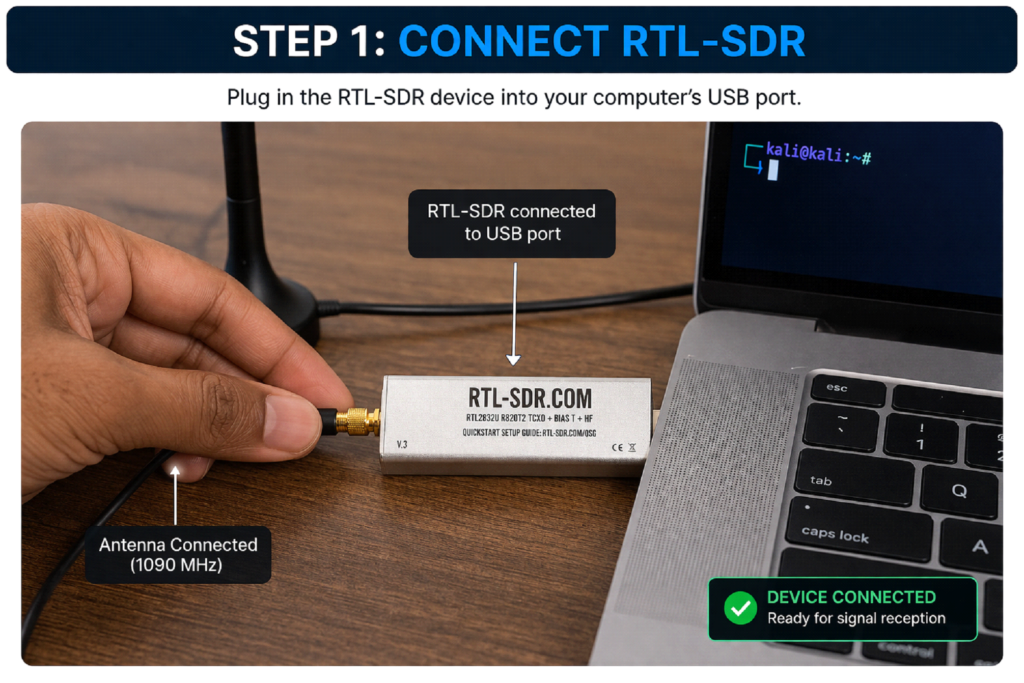
Step 1: Connect RTL-SDR
Plug in the RTL-SDR device.
Step 2: Navigate to dump1090
cd dump1090
[Download from:
https://github.com/antirez/dump1090]
Step 3: Run Tool
./dump1090 –interactive
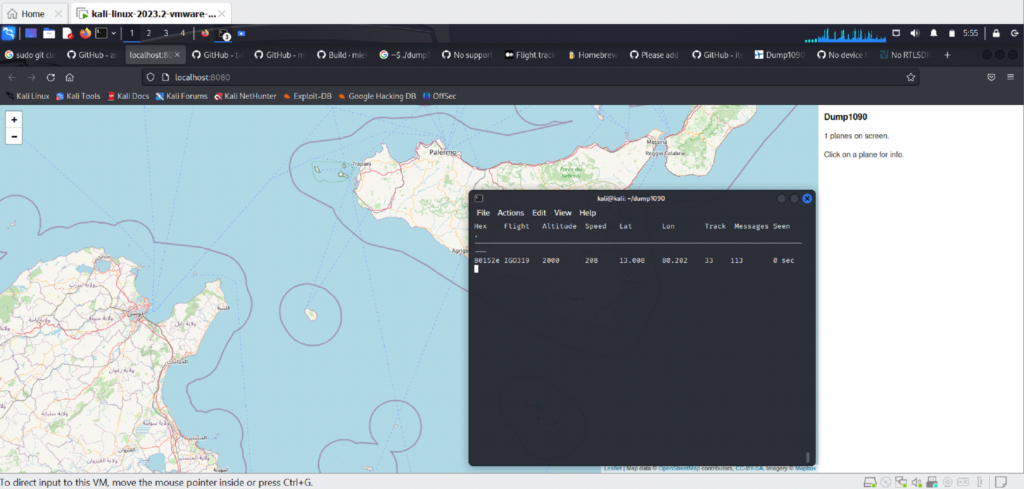
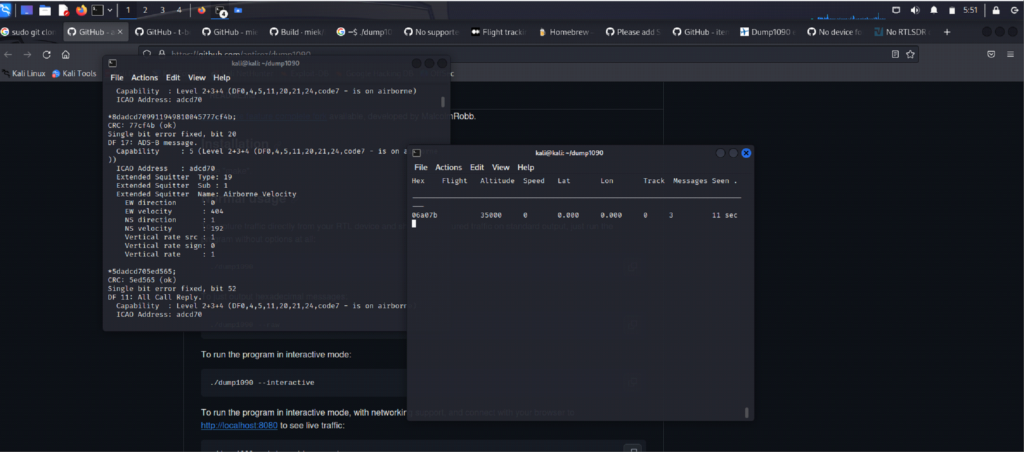
Step 4: Observe Output
You will see aircraft data like ICAO, flight number, altitude, speed, coordinates.
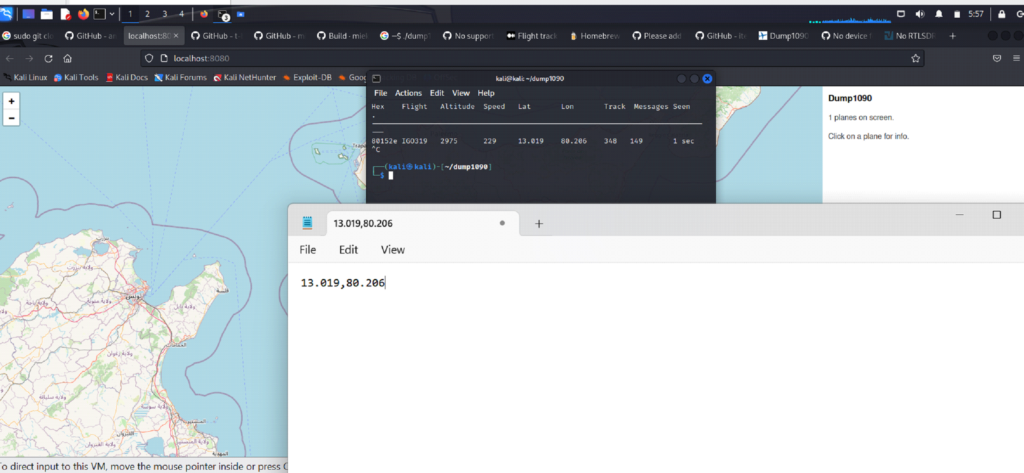
Step 5: Extract Coordinates
Example: 13.019, 80.206
Step 6: Validate in Maps
Paste coordinates in Google Maps.
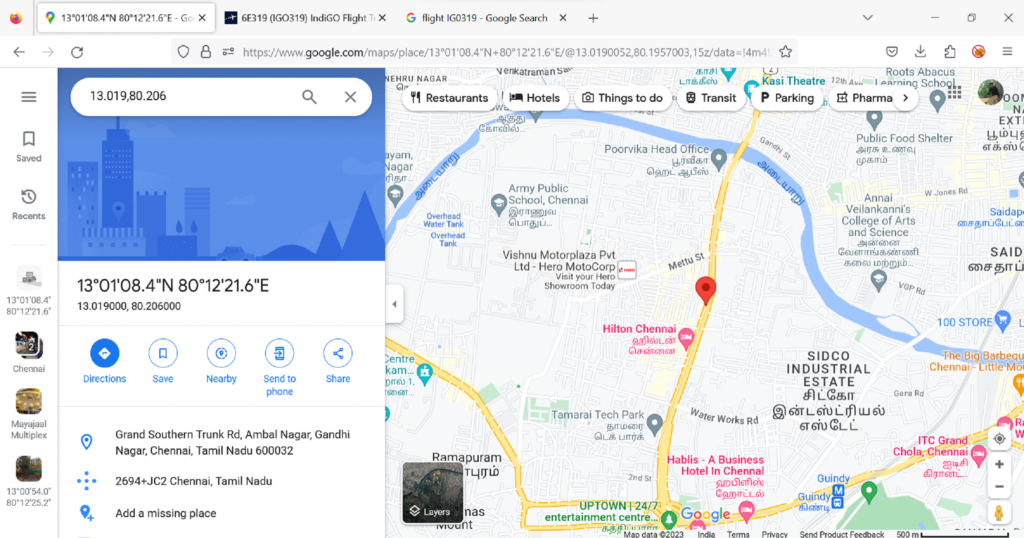
Step 7: Cross Verify Flight
Check flight ID on FlightAware.
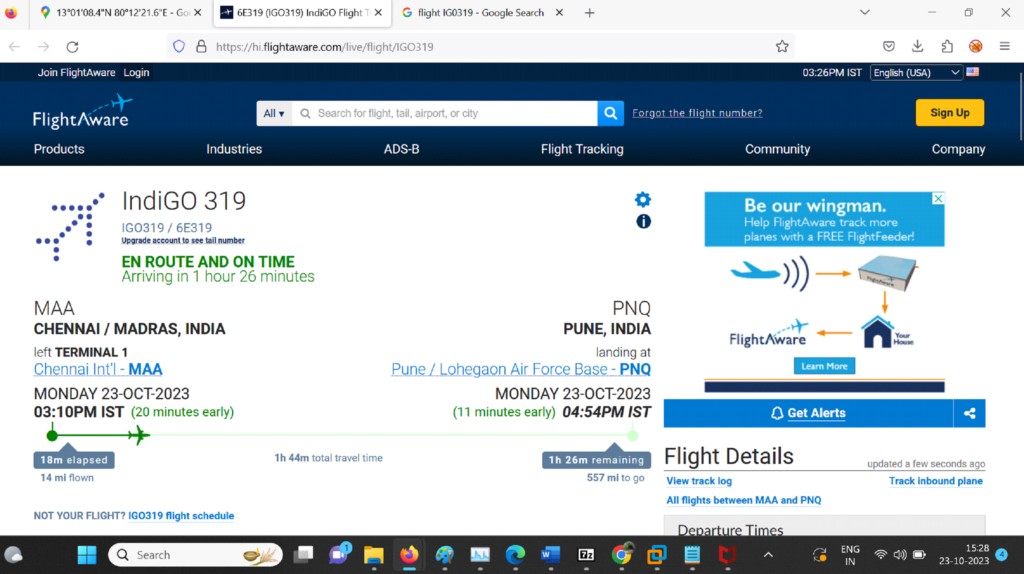
Conclusion
Successfully tracked real-time aircraft using SDR.